Magic Cloud Display Font: A Creative Workflow Essential
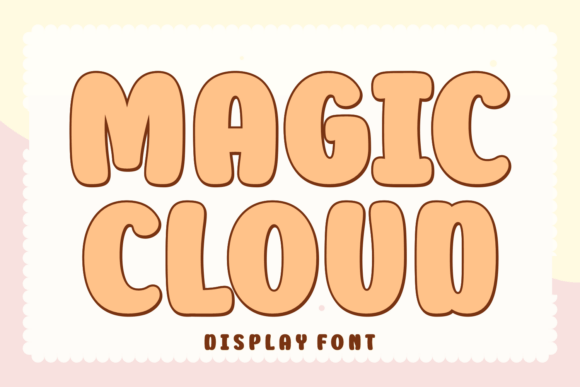
Typography plays a pivotal role in design, shaping how messages are perceived and remembered. Magic Cloud Display stands out as a distinctive typeface that blends boldness with whimsy, offering designers a versatile tool for crafting compelling visual narratives. This smooth, rounded font, handcrafted by 7ntypes, brings a sense of authenticity and warmth to any project. Whether you're working on branding, editorial design, or product packaging, integrating Magic Cloud into your workflow can elevate both the aesthetic and emotional impact of your output.
Understanding Magic Cloud in the Design Ecosystem
Magic Cloud Display isn't just another font—it's a carefully curated design asset that fits into a broader creative process. From initial concept development to final delivery, typography choices influence user experience and brand identity. As a hand-drawn, rounded typeface, Magic Cloud offers a clean yet expressive look that works across multiple mediums. It's particularly effective when you want to convey approachability, creativity, or nostalgia without sacrificing professionalism.
Designers often begin a project by selecting a primary typeface that aligns with the project's tone and purpose. Magic Cloud serves as a strong contender in this phase, especially when the goal is to evoke a sense of whimsy or vintage charm. It pairs well with minimalist layouts, allowing the font itself to become a focal point rather than a background element.
Preparation and Compatibility: Setting the Stage
Before integrating Magic Cloud into your design workflow, it's important to consider compatibility and preparation. The font supports multilingual characters, making it suitable for global projects or multilingual content. It's available in standard font formats such as OTF and TTF, ensuring broad compatibility across design software like Adobe Illustrator, Photoshop, InDesign, and Figma.
Organizing your font library is a best practice, especially when working with multiple projects. Create a dedicated folder for Magic Cloud and its variants to streamline access and ensure consistency across team members or collaborative workflows. If you're using design systems or style guides, include Magic Cloud in your typography section to maintain brand alignment across deliverables.
Practical Applications Across Creative Workflows
One of the strengths of Magic Cloud is its adaptability across design disciplines. Here are several use cases where this font shines:
- Book Covers: Use Magic Cloud to create eye-catching titles that stand out on digital and physical shelves.
- Magazine Layouts: Incorporate it in headlines or pull quotes to add a touch of personality without overwhelming the reader.
- Vintage T-shirts: The font’s retro appeal makes it ideal for apparel designs that aim to evoke a nostalgic or artisanal feel.
- Greeting Cards: Its warm and expressive nature enhances the emotional tone of handwritten-style messages.
- Product Packaging: Magic Cloud adds a human touch to labels, especially for artisanal or small-batch products.
Whether you're designing a poster, a logo, or a social media graphic, Magic Cloud can serve as a central design element that ties the composition together. Its rounded edges and smooth curves make it readable at various sizes while maintaining a strong visual presence.
Integrating Magic Cloud into Branding and Identity Systems
Brand consistency is crucial in marketing and communication efforts. Magic Cloud can be used as a secondary or accent typeface within a brand's visual identity, complementing more neutral primary fonts. For example, a coffee brand might use a serif font for body text and Magic Cloud for taglines or promotional graphics to highlight a cozy, handcrafted vibe.
When building brand assets, consider how Magic Cloud will be used across digital and print platforms. Ensure that the font renders well on screen, especially if it's being used in web design or email templates. If you're exporting files for print, always embed the font or convert text to outlines to prevent display issues.
Workflow Tips for Efficient Use
To make the most of Magic Cloud Display, consider the following implementation strategies:
- Use Layered Text Effects: Apply subtle shadows or outlines to enhance legibility when placing Magic Cloud over complex backgrounds.
- Pair with Complementary Fonts: Combine it with sans-serif or serif fonts for a balanced typographic hierarchy.
- Optimize for Readability: While Magic Cloud is highly expressive, avoid using it for long paragraphs. Instead, reserve it for headings, titles, and short text blocks.
- Test Across Devices: Preview your designs on different screens to ensure the font maintains its visual appeal and clarity.
- Version Control: If you're iterating on a design, keep track of which versions use Magic Cloud to maintain design continuity.
These small adjustments can make a significant difference in how effectively Magic Cloud integrates into your workflow and how consistently it performs across outputs.
Long-Term Considerations and Scalability
As with any design tool, long-term usability and scalability matter. Magic Cloud is a solid investment for creatives who frequently work with expressive typography. Because it's handcrafted and designed for clarity, it retains its appeal even as design trends evolve. When used thoughtfully, it can become a signature element in your design toolkit.
For businesses or designers working on recurring projects, maintaining a centralized asset library that includes Magic Cloud ensures that the font remains accessible and consistently applied. Licensing is another factor to consider—verify that you have the appropriate rights for commercial use, especially if the font will be used in client deliverables or mass-produced items.
Conclusion: Making Magic Cloud Part of Your Design Process
Incorporating Magic Cloud Display into your creative workflow is more than just a typographic choice—it's a way to infuse personality and authenticity into your visual communications. Whether you're working on branding, editorial design, product packaging, or digital assets, this font offers a blend of versatility and charm that few other typefaces can match.
By understanding how Magic Cloud functions within your broader design ecosystem, you can make informed decisions about when and how to use it. From initial preparation and compatibility checks to practical implementation and long-term maintenance, Magic Cloud can be a reliable and expressive asset in your creative toolkit.